




INTRODUCTION
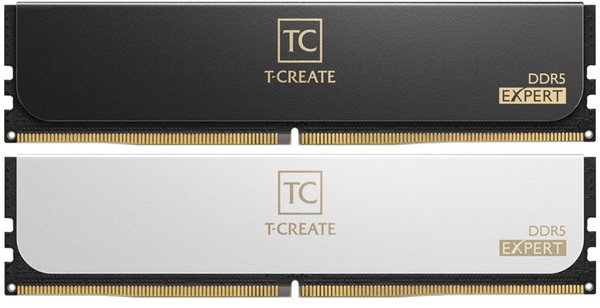
DDR5 CUDIMM RAM kits may have reached speeds of around 10000MHz (MT/s) but leaving out the fact that these are only compatible with a very limited number of motherboards (and Intel ones at that) not everyone out there is willing to spend large amount of money for them. Taking a look at current DDR5 sales numbers the largest share sits around 6000-7600MHz (MT/s) and yes, this represents UDIMM DDR5 kits. Now most DDR5 manufacturers may have already released their very own CUDIMM DDR5 kits but their goal is always to cover the largest percentage of the market and so I don't expect them to cease the development of UDIMM kits, at least not anytime soon. TEAMGROUP is among those said manufacturers and today I'll be testing their T-CREATE EXPERT 64GB 6000MHz CL34 Dual-Channel Kit.
As a leading provider of memory storage products and mobile applications to the consumer market, Team Group Inc. is committed to providing the best storage, multimedia and data sharing solutions. All TEAMGROUP’s memory module products come with a lifetime warranty, repair and replacement services. Team Group Inc., also listed company at stock exchange market in January, 2019. In 2016, TEAMGROUP established T-FORCE gaming series which includes all the gaming memory module. In 2020, TEAMGROUP established T-CREATE brand for creative users. For more information, please visit the TEAMGROUP website at https://www.teamgroupinc.com/en/
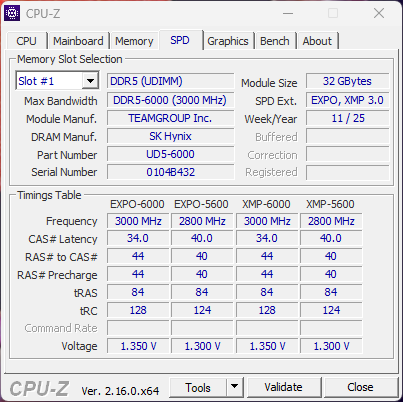
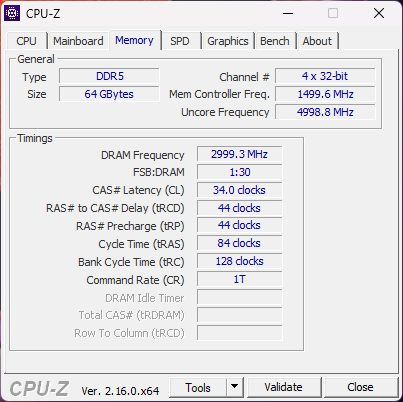
The T-CREATE EXPERT UDIMM line is Intel XMP and AMD EXPO compliant (not all kits) and is available both in gunmetal grey and white colors. In terms of available kits the T-CREATE EXPERT line includes 32/48/64/96/128GB dual-channel kits with speeds going all the way up to 7600MHz (5600/6000/6400/6800/7200/7600MHz), timings as low as CL28 (6000MHz CL28 - 6000/6400MHz CL30 - 6000/6400MHz CL32 - 6000/6400/7200MHz CL34 - 6800/7600MHz CL36 - 5600/6000/6400MHz CL38 - 6000/6400MHz CL40 - 6400MHz CL42) and voltages ranging from 1.2V and all the way up to 1.4V (5600MHz 1.2V - 6000/64000MHz 1.25V - 6000/6400MHz 1.35V - 6000/6400/6800/7200/7600MHz 1.4V). The T-CREATE EXPERT 64GB kit which I have here with me today is based on SK Hynix single-die unbuffered modules clocked at 6000MHz, with a timing of CL34 and require 1.35V. As with past models TEAMGROUP covers the T-CREATE EXPERT line with a limited lifetime warranty.
SPECIFICATIONS AND FEATURES
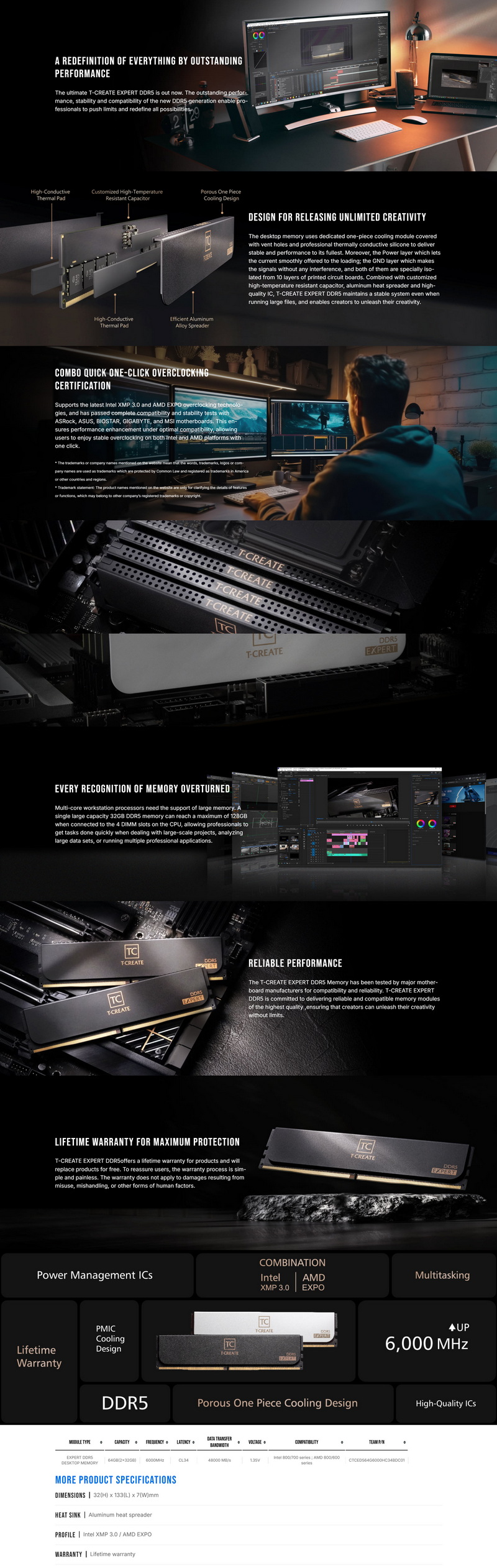
PACKAGING AND CONTENTS

The front of the box is taken by 2 product pictures (showcasing the available colors), company logo and the main product features.

A product description is available at the rear in 8 languages and right next to a sticker with the kit's serial number and barcode.

Along with the two RAM modules inside the box Team Group has also placed a case badge/sticker.
THE T-CREATE EXPERT 64GB 6000MHZ CL34

The T-CREATE EXPERT kit I'll be testing today is a low profile one measuring just 32mm in height and 7mm in thickness.

Typically, at the rear of the heatspreaders we find a sticker with the serial number, barcode and details of each module.

TEAMGROUP has used perforated heatspreaders at the top to allow for heat to exist with ease.


Since this line is meant for professionals RGB lighting is not present and so the modules don't stand out as much when mounted.
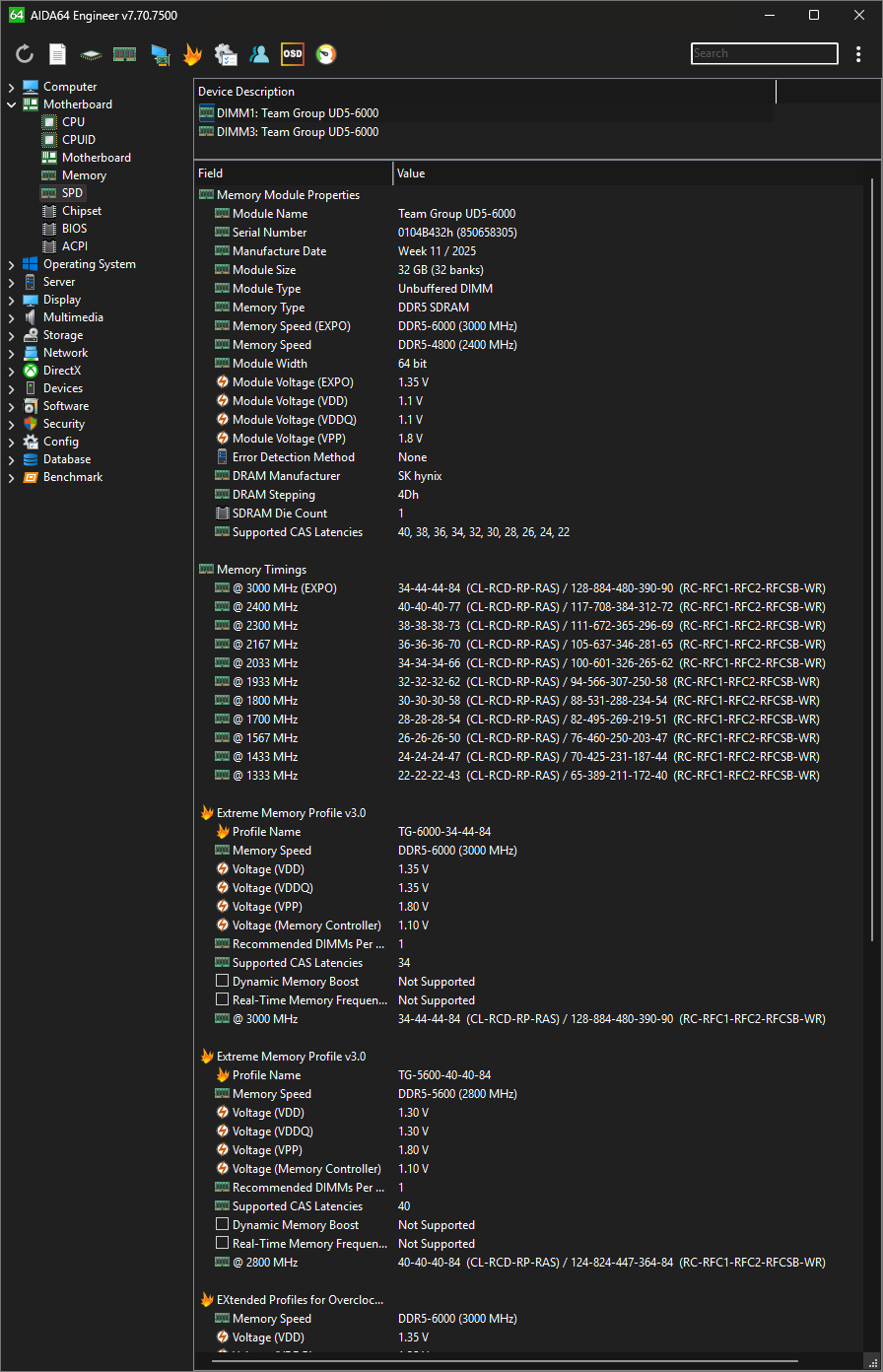
Here you can see some in-depth details about the kit thanks to AIDA64.
TEST BED

TESTING METHODOLOGY
Thanks to XMP 3.0 and EXPO profiles the only thing one needs to do in order to run a brand new RAM kit at its advertised frequency, timings and voltages is to choose/enable it from within the BIOS and reboot. That being said if you're into overclocking you may not wish to use the main XMP/EXPO profile but instead to choose your very own frequency, timings and voltages to achieve even higher performance numbers and that's exactly what we'll also be doing during our DDR5 tests. To be more specific aside testing each kit with its XMP profile I'll also be upping the voltages (up to 1.4V for 1.35V kits – even though most kits can function at higher voltages I don’t recommend doing so - RAM modules that use 1.4V/1.45V/1.5V will be tested up to 1.45V/1.5V/1.55V respectively) and frequencies (200MHZ increments) until i find the maximum achievable stable frequency (those results will be entered into the OC charts). I also thought about upping voltages and reducing timings instead of increasing the frequency of the modules as high as it can go (always stable and without using 0.5-1V over stock) but the end results are pretty much identical.
As for the how I'll be testing each DDR5 Dual-Kit to arrive in the lab well there aren't that many benchmark programs that only test RAM (or at least RAM and CPU without anything else coming into play) but I’ve got most of them and so you will be seeing results from following benchmarking programs, AIDA64 Engineer Edition, Cinebench Release 23, MaxMemm2, Passmark Performance Test v10.1, Sisoftware Sandra Titanium and WPrime v2.11. All tests are performed on a fresh Windows 10 Pro x64 installation (complete with all updates until the day of this review) and are repeated a total of 6 times after which the average numbers get recorded into the charts.
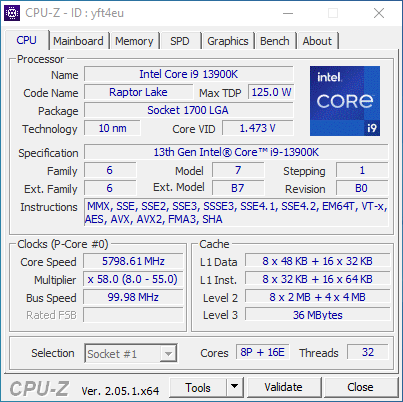
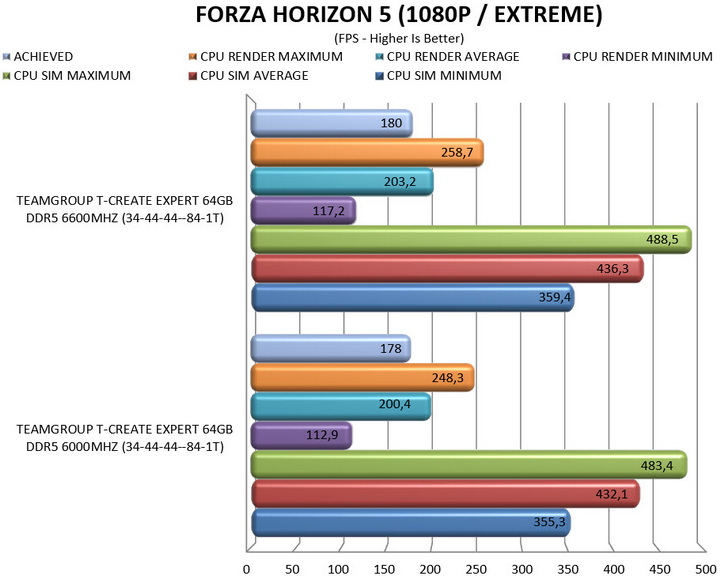
* Since you all decided for me to use the Intel Core I9-13900K for graphics cards tests I’ll also be using that for DDR5 tests (5.8GHz P-Cores / 4.7GHz E-Cores / RING 4.9GHz) and in order to showcase potential gains between stock and overclocked clocks/frequencies I’ll also be using Forza Horizon 5 (1080p/Extreme Graphics). Still do keep in mind that i can't dedicate a high-end GPU solely for DDR5 reviews so each time i review such a kit I’ll be using a different chart (the card used will be listed above).
TEST RESULTS - XMP 3.0 PROFILE
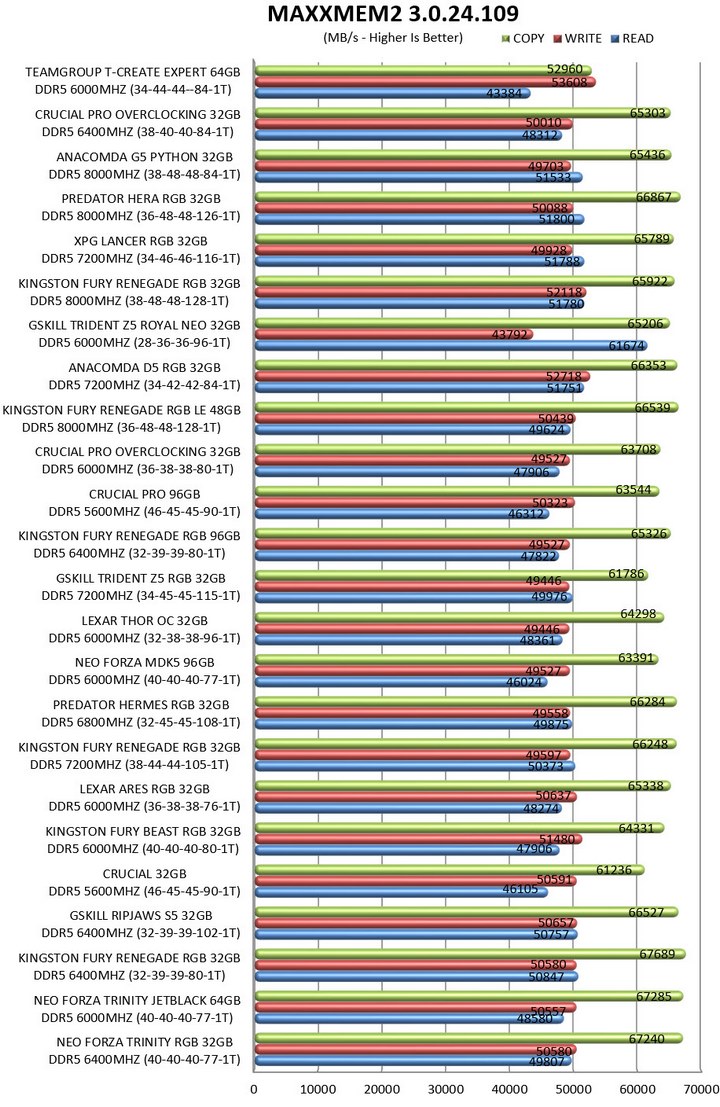
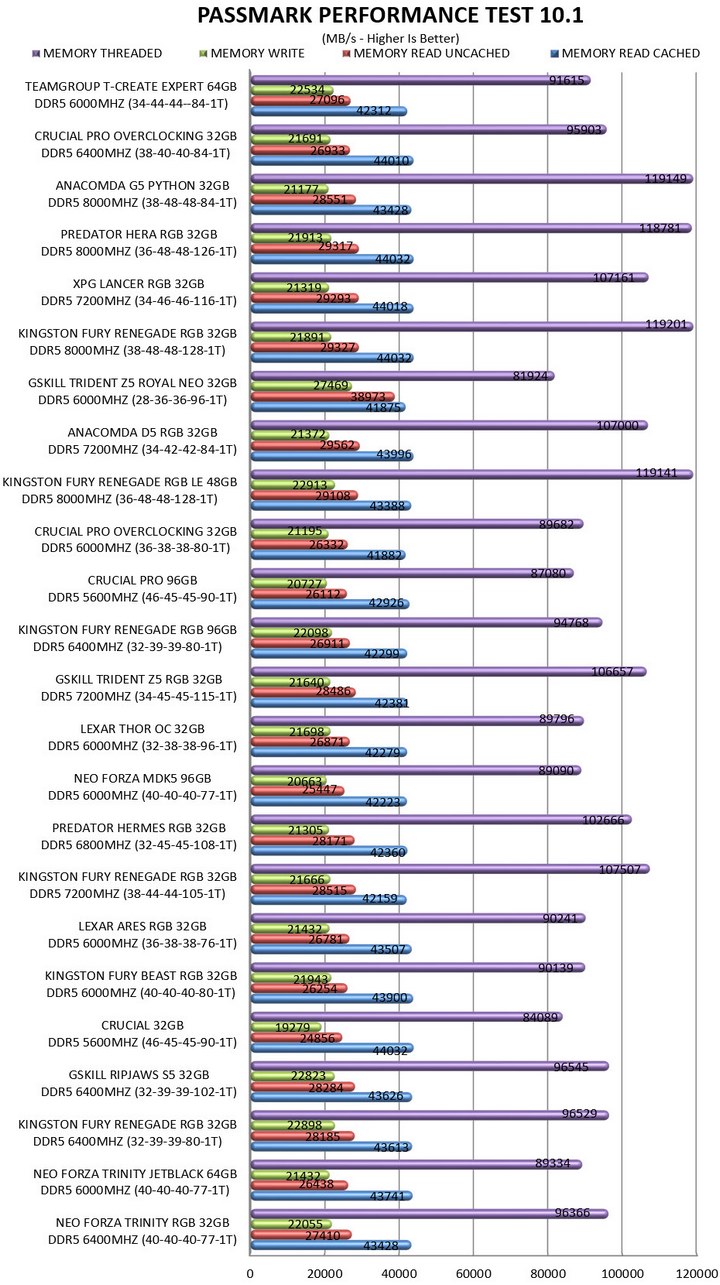
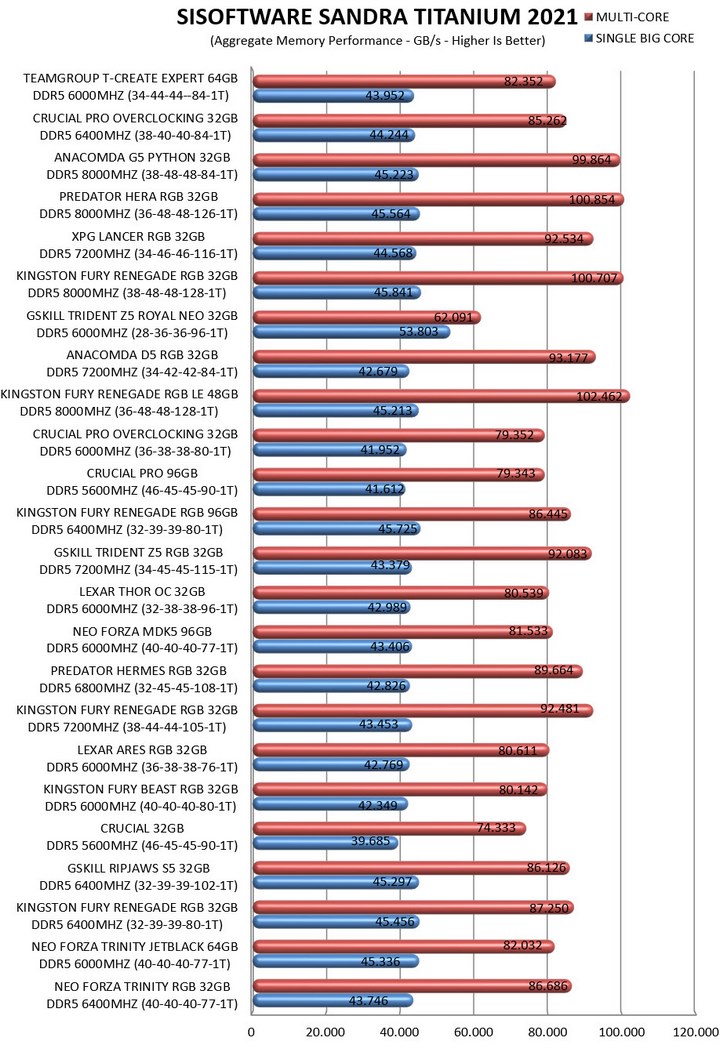
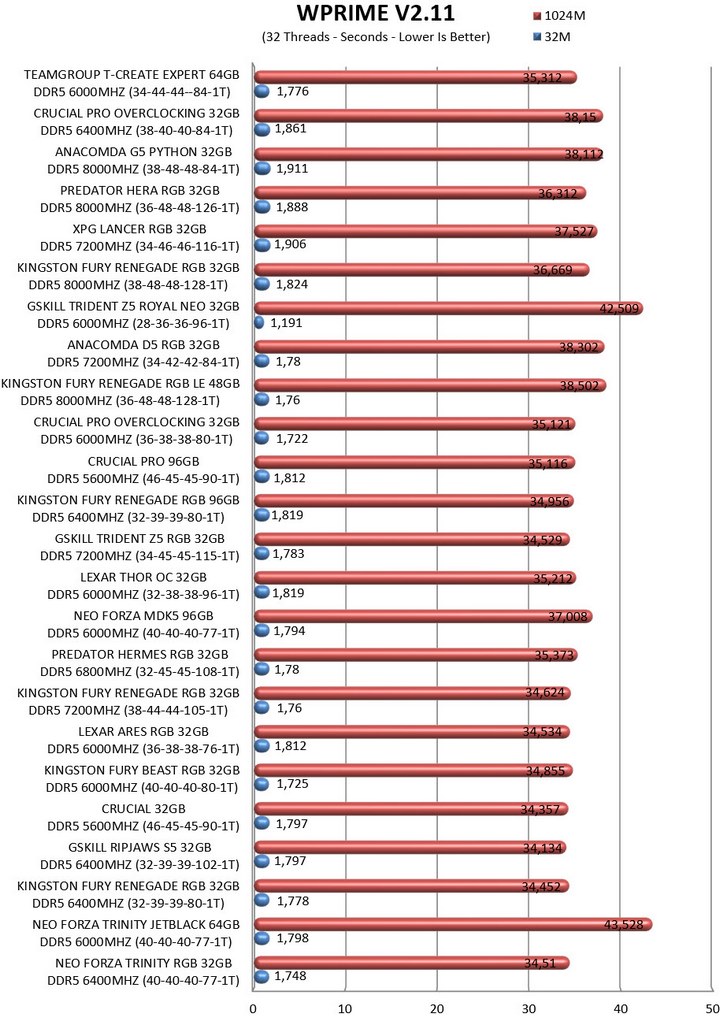
TEST RESULTS – OVERCLOCK
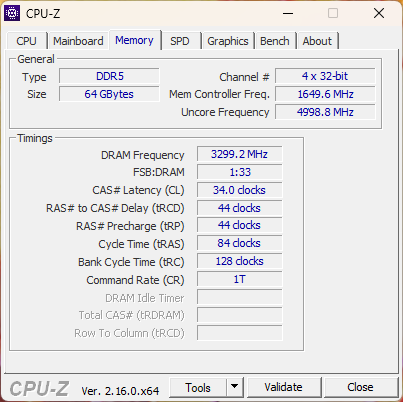
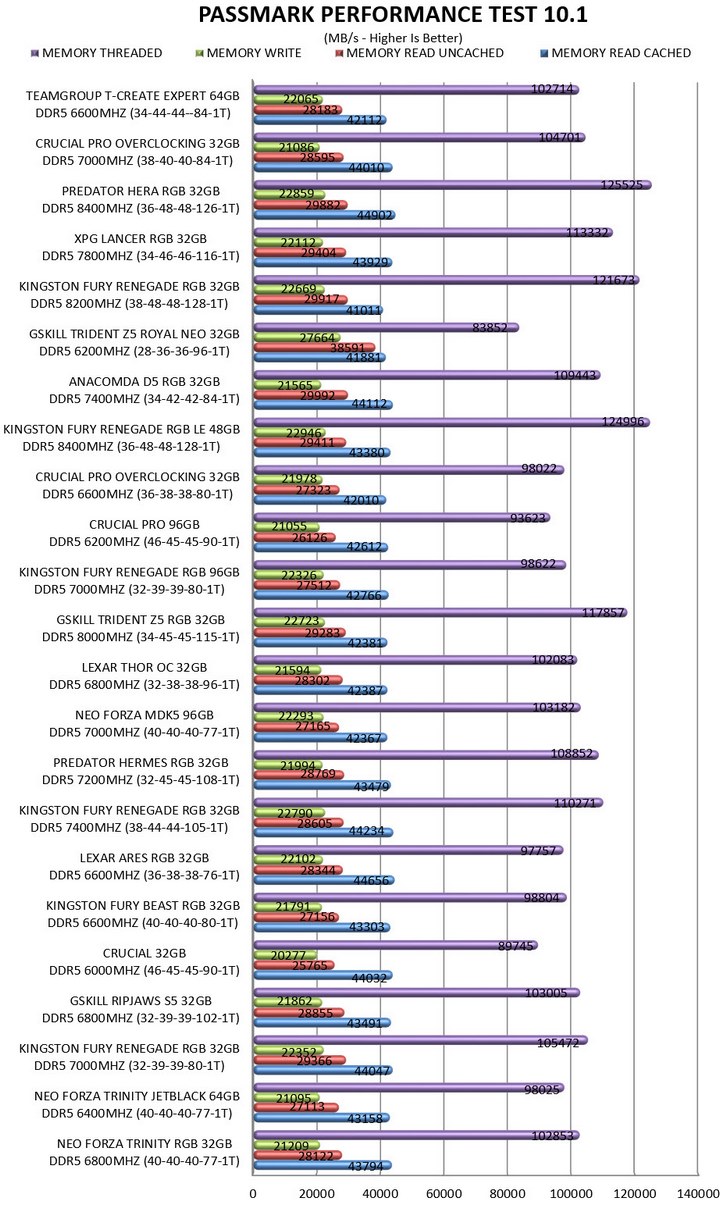
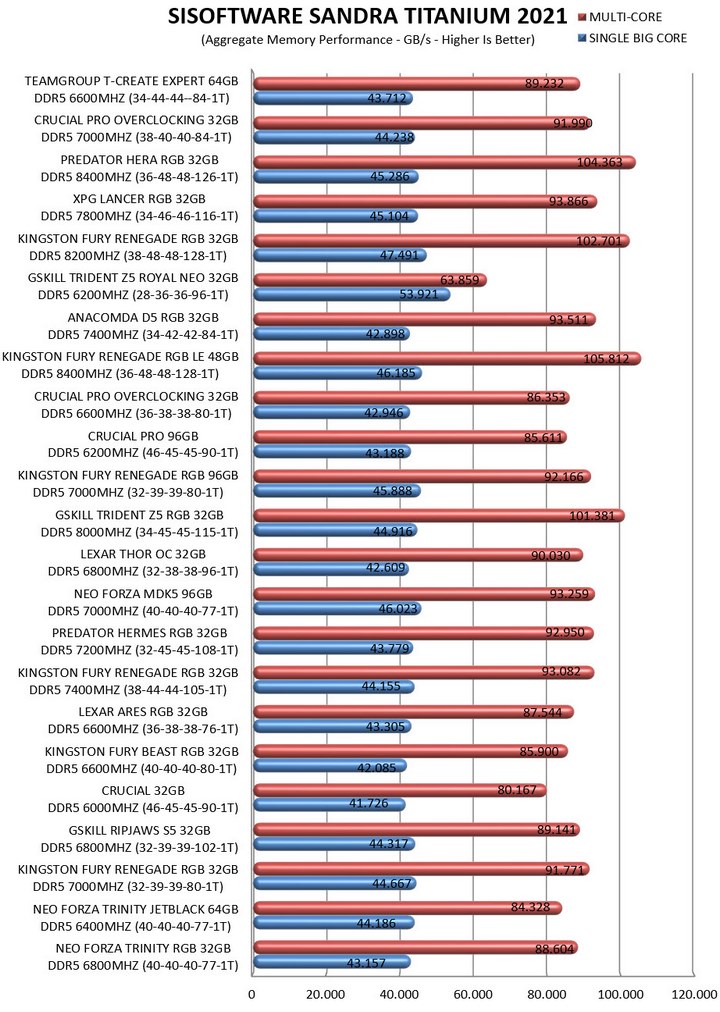
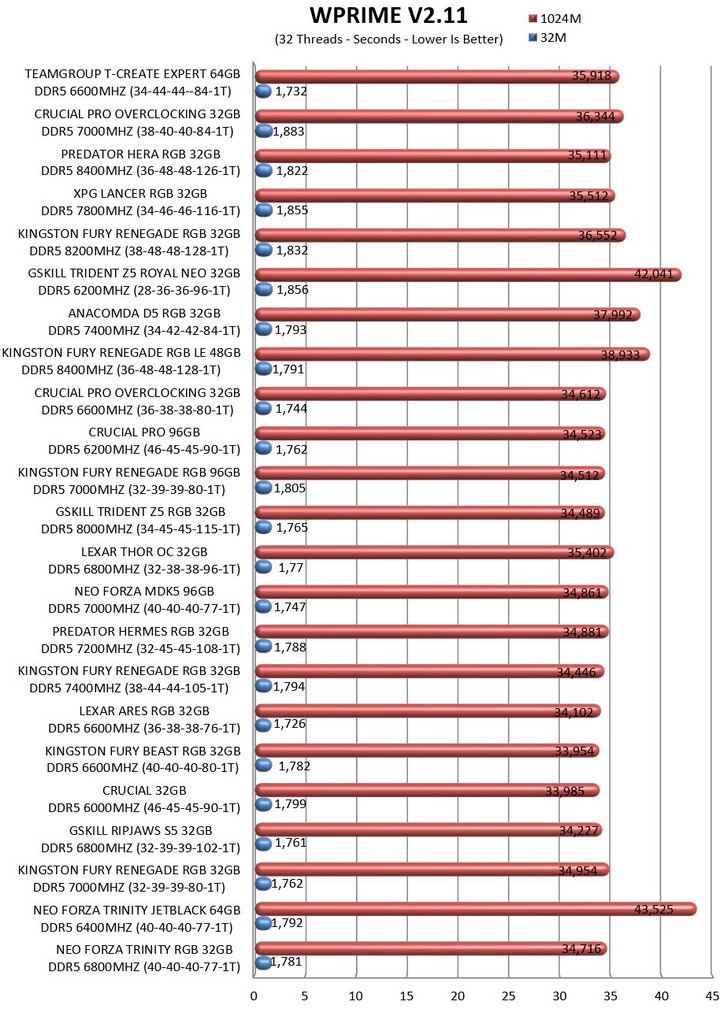
I was able to hit a stable 6600MHz with just 1.4V (upping timings will allow you to go even higher but I don’t see the point in doing so).
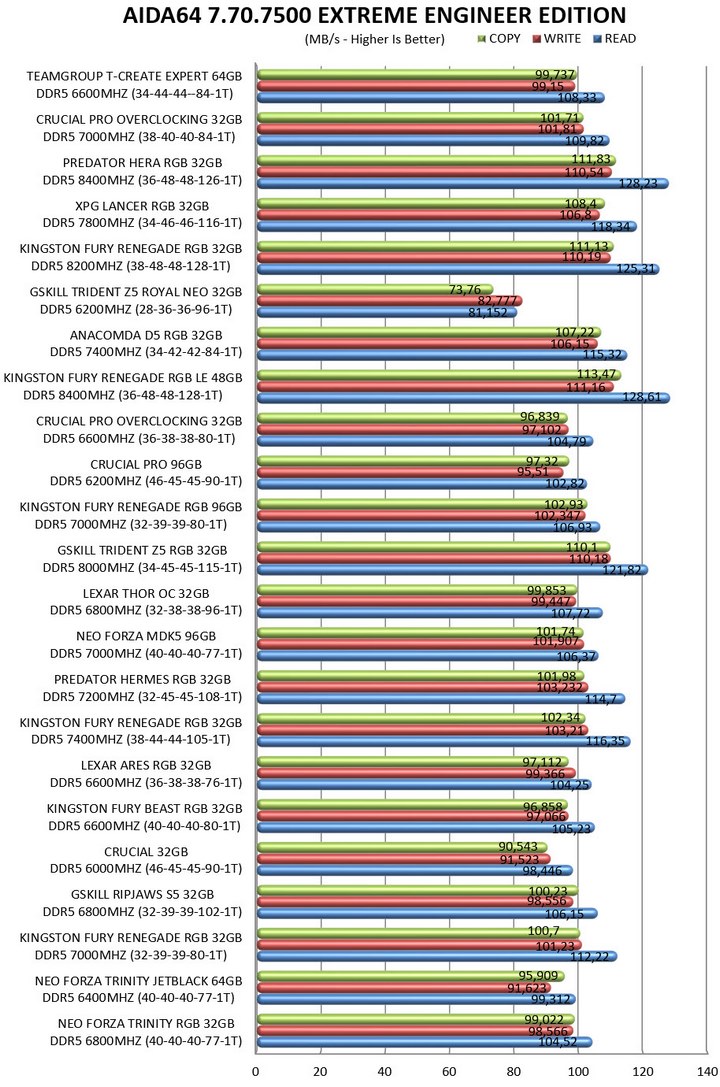
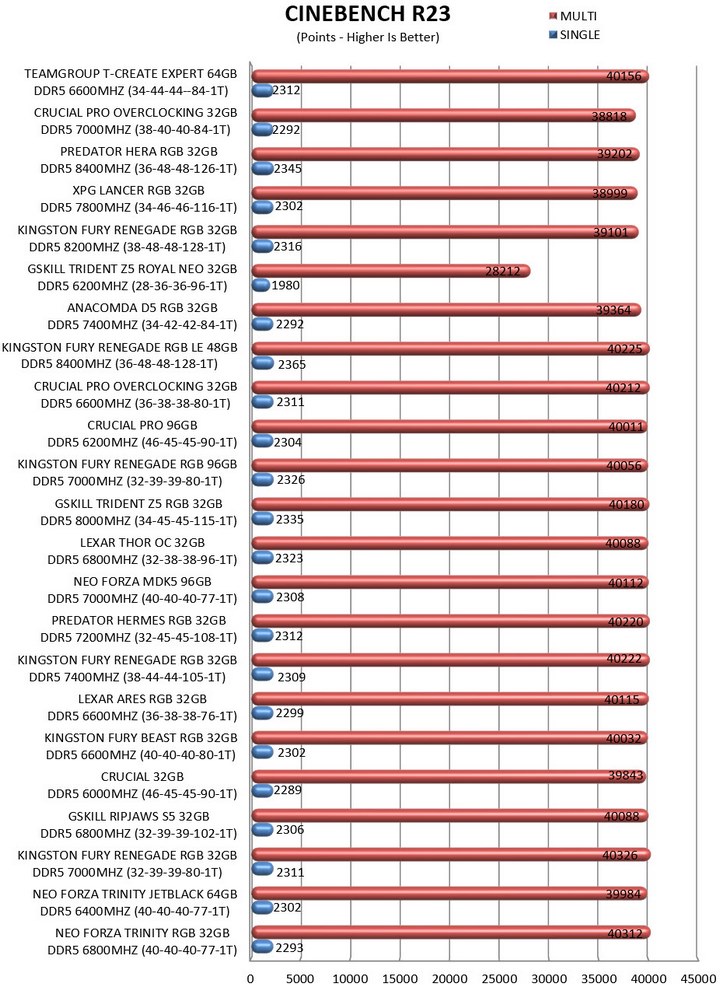
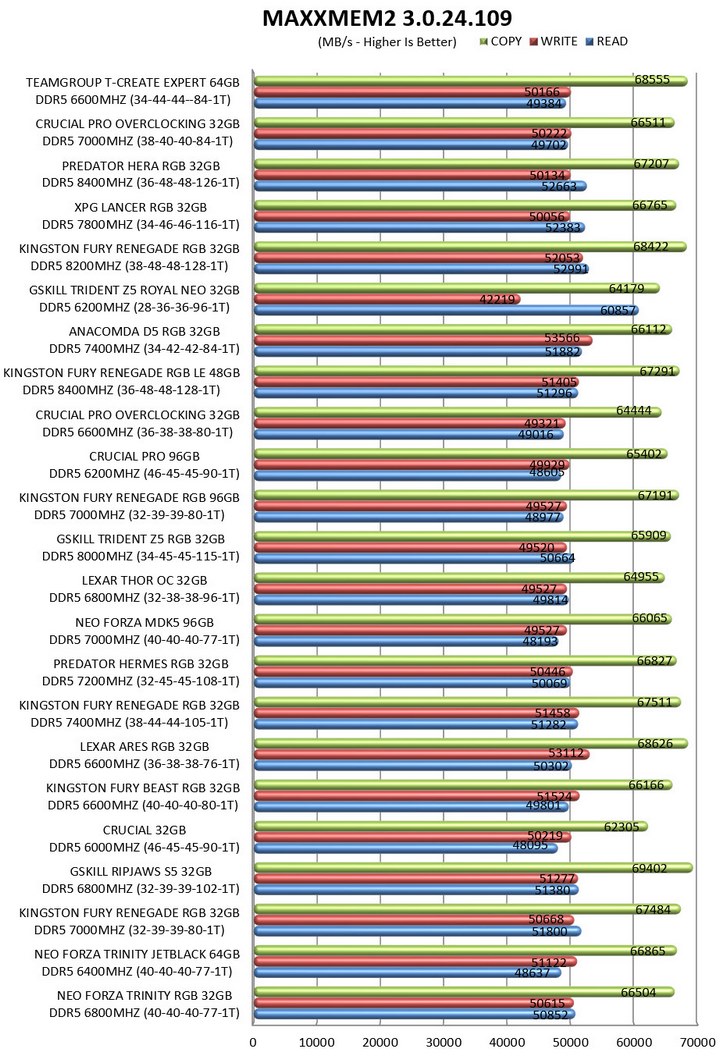
TEST RESULTS – FORZA HORIZON 5
CONCLUSION

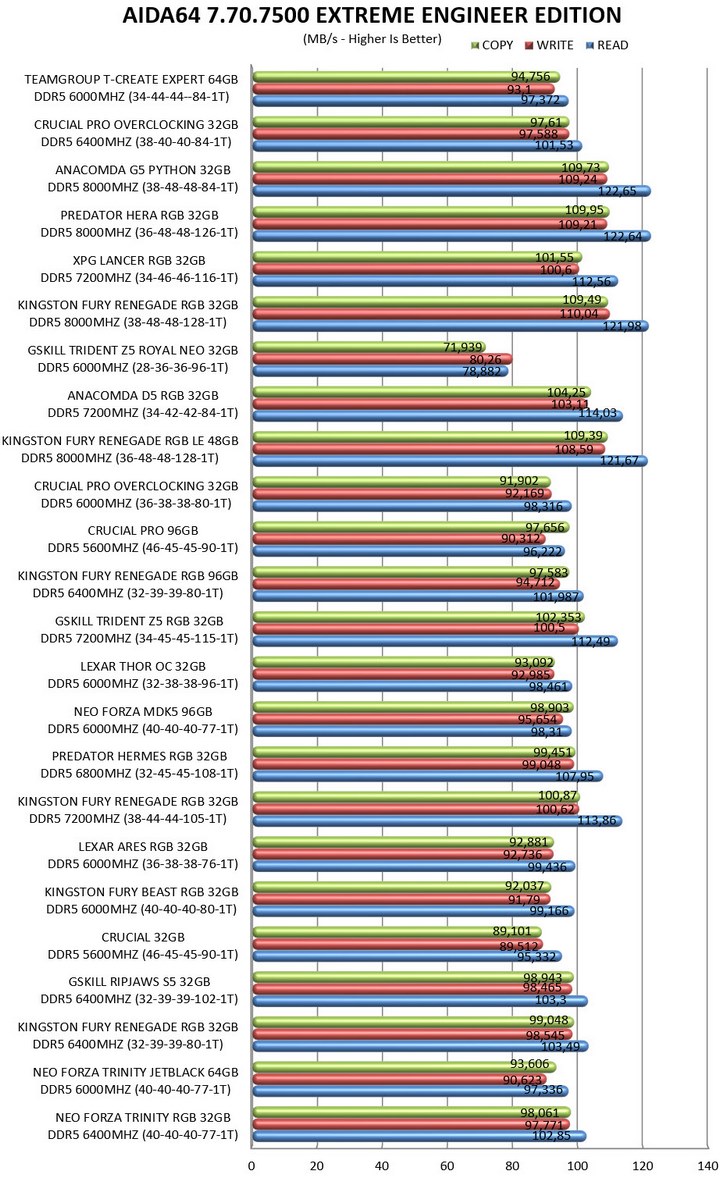
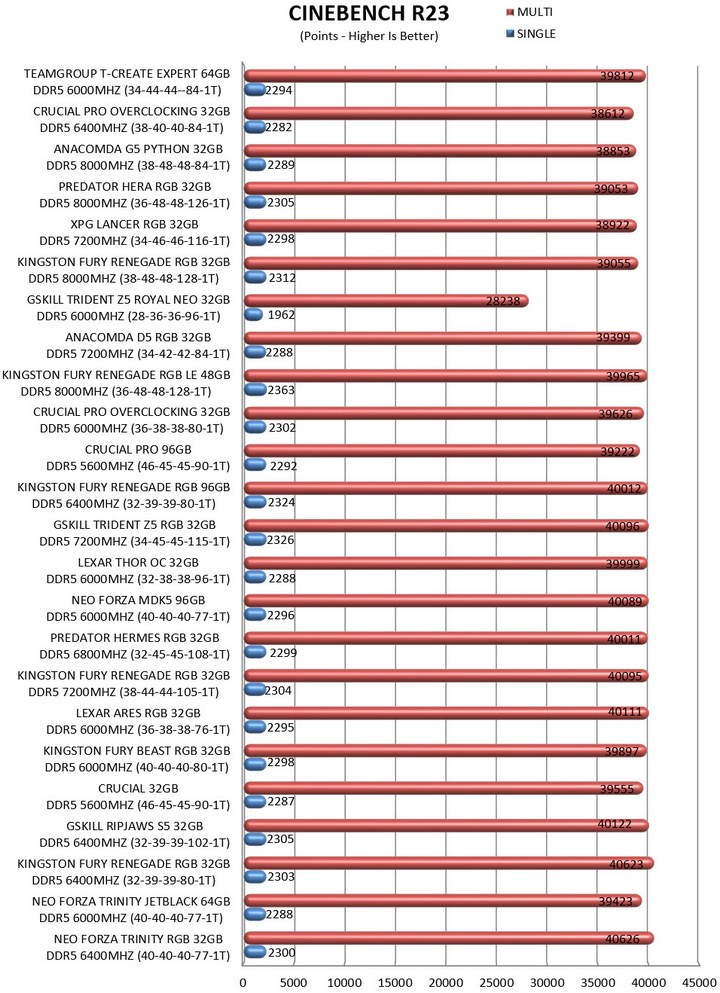
With the T-CREATE EXPERT 64GB 6000MHz DDR5 UDIMM dual-channel kit Team Group is clearly targeting professionals who care more about rather low timings and RAM capacity rather than speed/frequencies. The good news is that this kit does better compared to most similarly clocked kits (6000MHz) and so speed matters less than expected. The heatspreaders may lack RGB lighting but they do look nice and since they are low-profile ones you should be able to use most CPU air coolers out there without issue. The sole downside is that the T-CREATE EXPERT line doesn’t have any kits with speeds over 7800MHz. Yes, it may not really need them (TEAMGROUP does have other lines with such kits) but it wouldn’t hurt either (even for just marketing purposes).
With a current price tag set at USD180.99 inside the USA (Amazon.com) and at 251.49Euros inside the EU (Amazon.de) the T-CREATE EXPERT 64GB 6000MHz CL34 dual-channel kit by TEAMGROUP is priced very well, at least on the other side of the Atlantic (EU pricing needs looking into). At the end of the day this kit may not be the fastest out there, but it does offer good overall performance, comes with robust low-profile heatspreaders, the 64GB should be more than plenty for most people and the limited lifetime warranty is always welcome so the Golden Award is in order.

PROS
- Build Quality
- Very Good Performance
- Overclocking Headroom
- Limited Lifetime Warranty
- Available In Gunmetal Grey & White Colors
- Low Profile Heatspreaders
- Price (USA)
CONS
- Price (EU)
- Lack Of ARGB Lighting (For Some)




